
Windows 10 / 11
Android 8.1+
Local only
MIT
Your screen time, per app,
kept for good.
Windows keeps no usable record of how long each app was actually in front of you: what it has measures which processes were running, not which one had focus, keeps 7 days, and lives on the system drive, so a reset wipes it. Android keeps about 10 days. Screen Time Tracker records real foreground time on both, keeps it on a drive that survives a reset, and shows it in a dashboard on your own machine.
How much history survives
12 months agotoday
Windows (SRUM)7 days, and process presence, not focus
Androidabout 10 days of usage events
After a Windows reseteverything on C: is gone
nothing
Screen Time Trackereverything since it started recording
How it works
Windows PC sampler at logon, ingest hourly
- SampleAn unelevated sampler checks the foreground window every 2 seconds, and whether the session is locked.
- LogEach span goes to a daily JSONL file, written so a crash or a logoff loses nothing already recorded.
- IngestEvery hour, or on Sync now, new spans go into SQLite. Re-running it adds nothing twice.
- Back upA consistent copy is written with SQLite's
backup()after every write.
Android phone in the background, every few hours
- ReadThe Screen Time Reporter app reads the phone's own
UsageStatsManagerevents. - RebuildIt turns them into app sessions, screen-on time and unlocks, on the phone.
- SendStraight to the dashboard on your LAN with a bearer token, or sealed end-to-end to an optional cloud inbox that works from any network.
SQLite on a non-system drive
the code refuses
C:; a backup copy after every write
Next.js dashboard
starts at logon on port 7844, behind one password, reachable from your LAN
A tour of the dashboard
Scroll inside the frame. Every number in these is invented, written through the real ingest code by npm run demo:seed.
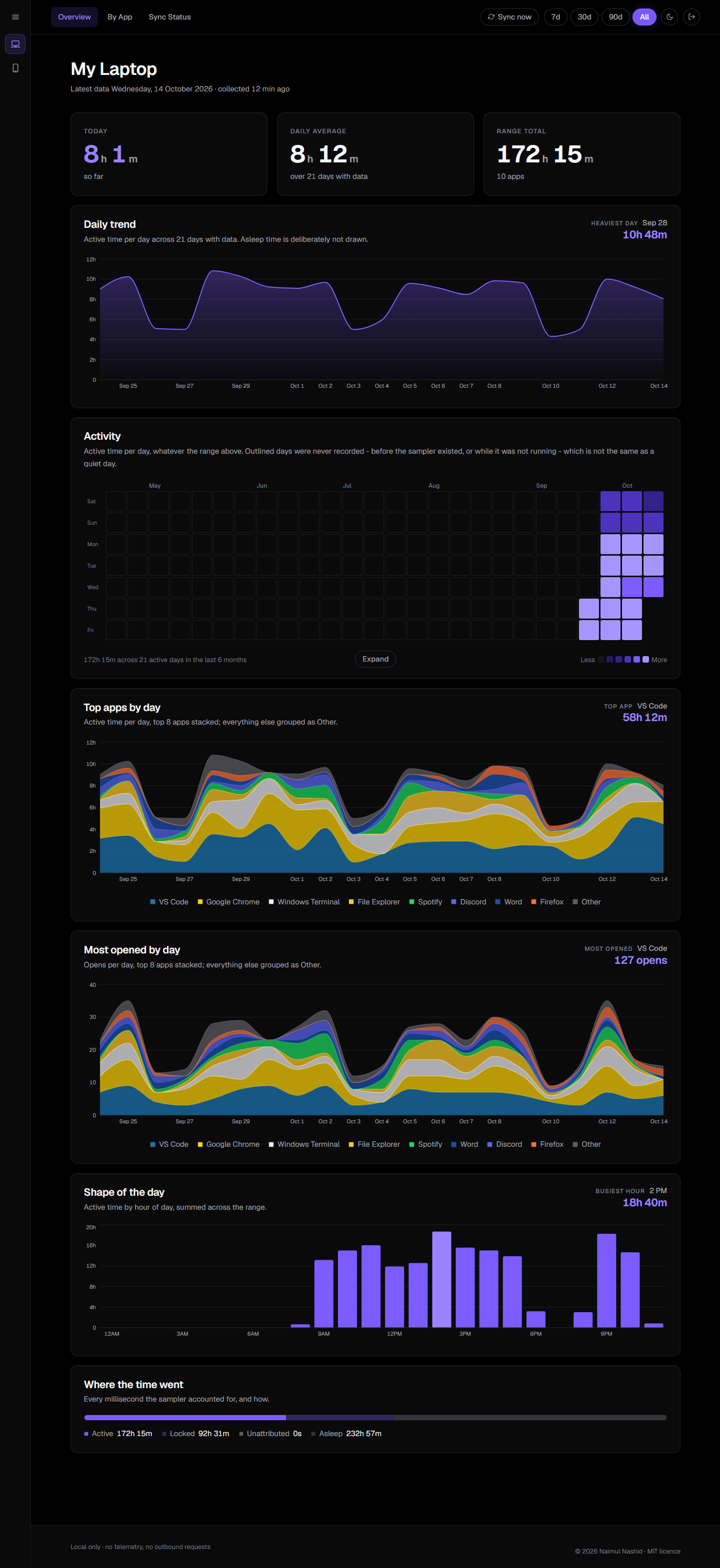
Every chart, live
Drawn from a fixed random seed, so every number is invented. The switch repaints them as the dashboard repaints each device.
Daily trend
OverviewOne unbroken line. A day nothing was recorded dips to zero, and its tooltip says "Not recorded" rather than calling it a quiet day.
Activity heat map
Overview · Activity pageShades are even steps, since a day cannot pass 24 hours. Outlined cells were never recorded. Expand opens every day from the first one recorded, six months to a row.
Top apps by day
OverviewThe top eight by their own measure, the rest as Other.
Shape of the day
Overview · App detailLocal time, summed over the range. The busiest hour is drawn brighter.
Where the time went
OverviewTop apps
By AppGrouped by resolved app, not by executable path, in each app's brand colour. Each bar opens that app's detail page.
One app, day by day
App detailThe typical session is the median, not the mean, so one long sitting cannot inflate it.
The app table
By AppApps with 10 minutes or more, or 30 opens across 5 days, are listed. The rest fold behind a button that says what it folded.
Everything it does
Recording on Windows
- Real foreground time, not process uptime: a sampler records which window has focus every 2 seconds, and when the session is locked.
- No Administrator rights at any point. The sampler and the hourly ingest are two unelevated logon tasks, run hidden.
- Crash-safe daily JSONL, and the sampler restarts itself after a crash, up to three times.
- Time it could not attribute is recorded as its own kind, and a sleeping laptop is a gap, never usage.
- Sync now in the top bar ingests on demand.
- Or let the standalone Screen Time Native app record, and ingest from its database instead.
Android phones
- Screen Time Reporter, an app with no third-party dependencies, released as a signed APK. Android 8.1 and newer.
- Screen-on time and unlocks on Android 9 and newer; below that the phone records neither, so its pages show time in apps and say so.
- The first sync backfills the ~10 days the phone keeps. If the dashboard has gone 168 hours without its history (sooner on a phone that keeps less), the app warns before any of it is lost.
- A status card answers "is it working?": green, amber after three days, red with the reason.
- Optional cloud inbox: the phone posts to a fixed HTTPS address from any network, encrypted to a key only the PC holds. The inbox can neither read nor forge an upload.
- Any number of phones, each at its own URL.
npm run android:mergefolds a reinstalled phone's history back together.
Reading the dashboard
- Overview, By App, App detail, Activity and Sync Status for every device.
- Range chips (7d, 30d, 90d, All) live in the URL, so every view is a link.
- Every chart names its headline figure in its corner: heaviest day, busiest hour, top app.
- Each app's page: total, opens, typical and longest session, per day and per hour, and every path it was merged from.
- Sync Status reads the sampler's heartbeat, not the task state, and pages through every ingest run, 25 at a time.
- A sidebar lists each device in its own accent: violet for the laptop, green for phones.
Names and colours
- Executable paths resolve to the app's name, and pieces of one program merge into one entry, with the merge listed on its page.
- Rename any app, or pick its colour; both are stored with the history and survive a reset.
- Bars in each app's brand colour, kept readable on both themes.
- Logos are dropped into a folder per device. None ship, since they are other companies' trademarks; until then an app shows its initial.
Numbers you can trust
- Checked against Android's Digital Wellbeing. The check found two real bugs in rebuilding time from events, both fixed, and is re-run after any change there.
- Opens are visits: an app's sessions with nothing else between them and under 30 seconds apart count once, with their time summed, never spanned.
- The phone's headline is screen-on time, never a sum of its apps, which cover about 0.76 of it; the gap is shown, not hidden.
- Time the sampler could not attribute is its own segment, with a warning above 10%.
- Averages divide by days with data, and ranges end on the newest day that has some.
Private and secure
- No cloud service, account or telemetry. The one optional outbound connection is the phones' encrypted inbox.
- One password gates every page, and fails closed. Wrong guesses are throttled.
- Sessions are signed with a key derived from the password; the phone has its own token.
- A strict Content-Security-Policy, and a script that blocks the dashboard on Public networks.
Survives a reset
- The database lives on a non-system drive, backed up with SQLite's
backup()after every write. npm run backup:kitputs the secrets and local-only files offC:.npm run drillrestores into TEMP, verifies it, and lists anything a reset would lose.npm run restorebrings the database back after a reset, and has been run for real.- No native modules: SQLite is Node's built-in
node:sqlite, so a clean install years from now still works.
Pleasant to use
- Dark, light, or follow the system, remembered per browser and applied before the first paint.
- Installs as an app on the PC, with its own window and the clock icon.
- Loading skeletons built from each page's own markup, so nothing moves when the data lands.
- Built to WCAG 2.1 AA: measured contrast, a text summary for every chart, a skip link.
- Phones get the desktop layout, zoomed to fit.
- The dashboard starts hidden at logon and restarts itself after a crash.
Try it without your data
npm run demo:seedwrites a synthetic laptop and phone through the real write paths;npm run demoserves them.npm run demo:shotsretakes every page, in both themes, from a scratch build that cannot see real logos or config.npm run selftestneeds no device and no database.
Built with
Next.js 16React 19TypeScript
Rechartsnode:sqliteGeist
PowerShell samplerKotlin, no libraries
Supabase Edge Function (optional)
Needs Windows 10 or 11, Node.js 22.16+, and a drive that is not the system drive.
For phones Android 8.1+, and JDK 17 or Android Studio to build the app yourself.